Choose how many watches you want to check.
Both plans include watch identification, indicative value estimates and saved reports. The asking-price calculator and seller checklist are available in your web reports, including on your phone.
Subscribe securely, then set up your Grailr account by email. Already subscribed? Sign in to manage your plan.
Pay monthly. Cancel renewal anytime.
Collector
For collectors checking their next potential purchases.
- 40 watch scans per month
- Full database search
- Available pricing sources
- Price history charts
- Unlimited access to saved reports
Billed monthly. Cancel renewal anytime.
Dealer
For frequent buying research and larger watch shortlists.
- 120 watch scans per month
- Full database search
- Available pricing sources
- Price history charts
- Unlimited access to saved reports
- Market signals dashboard
- Market movement filters
- Priority support
Billed monthly. Cancel renewal anytime.
Save 16% with yearly billing
Compare Plans
| Feature | Collector | Dealer |
|---|---|---|
| Watch checks | 40 / month | 120 / month |
| Watch identification | ✓ | ✓ |
| Price estimates | ✓ | ✓ |
| Database search | ✓ | ✓ |
| Available pricing sources in scan reports | ✓ | ✓ |
| Price history where available | ✓ | ✓ |
| Access to saved reports | ✓ | ✓ |
| Market signals dashboard | — | ✓ |
| Market movement filters | — | ✓ |
| Priority support | — | ✓ |
Prices in USD. Annual plans are charged once per year; scan allowances reset monthly. Existing subscribers keep their current price and allowance while their subscription continues. App-store prices may vary by country.
From photo to buying research
Three steps before you make an offer.
- 01
Scan the watch
Upload a clear dial photo or take one with your camera. Grailr suggests the brand, model and possible reference.
- 02
Understand the price
Enter the seller’s asking price, add known costs and compare it with the report’s value range or available reference-matched asking prices.
- 03
Decide what to investigate
Use the report’s seller checklist to ask about originality, service history, fit and total cost. Revisit the saved report before making an offer.
Try the report before you subscribe
A watch photo. A more informed next step.
Explore three real Grailr outputs. Choose a watch, enter an asking price and see which questions to take back to the seller. No account needed to explore these examples.
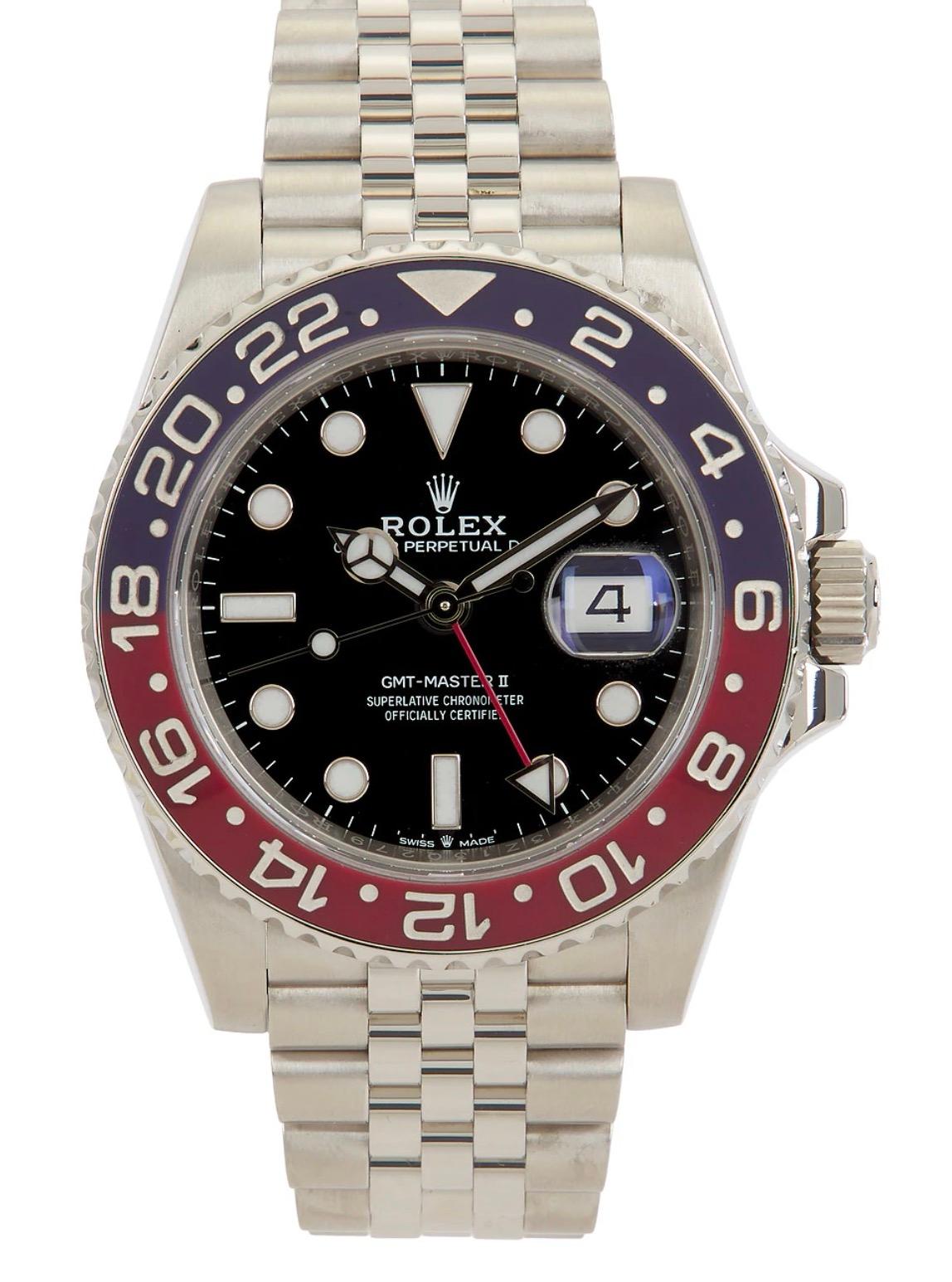
Suggested identification
Rolex GMT-Master II
Suggested reference 126710BLRO
Photo-based value estimate · USD
$18,500–$24,000
Compare the exact reference, then look at condition and what is included.
Report captured 2026-11-17. These saved examples show the output for the pictured watches. Estimates are not current quotes; listing snapshots carry their own collection dates.
Open this complete report →Where does the seller’s price sit?
Enter an asking price to compare it with this report. Add known costs to see your total outlay.
Dated asking-price snapshot
eBay · 126710BLRO · USD · 24 new / 42 pre-owned listings. Check current listings before negotiating.
Collected 2026-11-16 · New and pre-owned conditions are seller-described.
Questions to ask about this watch
Built from this report’s suggested reference, movement and features. Tick off the points you have checked; ticks reset when you leave.
For the watches you keep coming back to
Build your shortlist. Keep your research.
Buying for your collection
Check the watches on your shortlist, compare asking prices one report at a time and return to the details before contacting a seller. Your next search starts with a saved history of what you have already researched.
Collector · 40 scans each month · $29.99/month
Researching watches more often
Work through more potential purchases, revisit saved reports and prepare questions about condition and service before an inspection. Dealer provides a larger monthly allowance and priority support.
Dealer · 120 scans each month · $79.99/month
Both plans include saved reports and the web buying tools. Viewing a report or comparing another asking price within it uses no additional scan. Available price data varies by watch.
Choose your planClear expectations, before you subscribe
Better research starts with better questions.
What happens after I subscribe?
Choose a monthly or annual plan and pay through secure checkout. After payment, use the account-access link to set up your Grailr account, or sign in to your existing account. Open Scan a Watch, upload a clear photo and review your saved report. Use the same account on desktop, mobile web and Android.
What photo should I use?
Use a sharp, well-lit photo with the whole dial, logo and bezel visible. Avoid glare, heavy angles, collages and tiny listing thumbnails. A front photo is a starting point; ask the seller for caseback, movement and reference-marking photos to verify details it cannot show.
How does Grailr help me decide whether to buy?
Grailr suggests an identity and value range, shows available asking-price evidence, and helps you compare a seller’s price and prepare specific questions. Exact reference, originality, physical condition, service history and seller terms still matter. Arrange an independent inspection for authenticity and condition before committing.
Why are some price comparisons missing?
Collected prices are shown when we have evidence for the exact reference. We keep new and pre-owned listings separate and show the source, collection date and sample size. Small samples and older snapshots are flagged. A photo-based estimate remains separate from listing evidence; neither is a verified completed-sale price.
What if the identification is uncertain or wrong?
Review the reasoning and alternative matches, then check the suggested reference against the seller’s markings and documentation. A reference may be left unknown when the image is insufficient. You can contact support with the report link and the detail to review. A clearer photo may help; a new saved report uses another scan.
Does an unsuccessful scan use my allowance?
Failed requests that do not save a report are refunded automatically. A saved report uses one scan, including a report that cannot identify the watch. Reviewing saved reports, using the asking-price calculator and copying seller questions do not use extra scans.
How do monthly allowances and cancellation work?
Collector includes 40 scans per calendar month; Dealer includes 120. Allowances reset on the first at 00:00 UTC, including on annual plans, and unused scans do not roll over. Manage website subscriptions in your dashboard and Google Play subscriptions in Google Play. Cancellation stops renewal; paid access continues until the billing period ends.
Explore our methodology or get help with a report.
Go into the conversation prepared.
Identify a watch →
Learn what a photo can reveal, which details matter, and how to check a suggested reference.
Understand its value →
Separate an indicative estimate from an asking price, and account for condition and provenance.
Know what to verify →
Use our authentication guidance to prepare questions for a qualified watchmaker.
Grailr on the web and Android
Your watch research.
One account, wherever you are.
Identify a watch, explore indicative value estimates and revisit your saved reports in your browser or the Android app. Sign in with the same account to use your plan on either.
Collector and Dealer plans include monthly scans and research tools. Choose a plan, pay securely, then set up your account.

Web or Android: choose how to start
On iPhone? Use Grailr in your mobile browser. Android app available on Google Play.